

Agent Council
Formerly Agent Society
AI Mission Control · Hackathon submission
Turn complex briefs into a coordinated council.
Agent Council, formerly Agent Society, is a frontend-first multi-agent AI workspace that turns a mission brief into a focused execution process, readable progress, and a final structured response.
- Role
- Creator and Full-Stack Developer
- Status
- Hackathon project
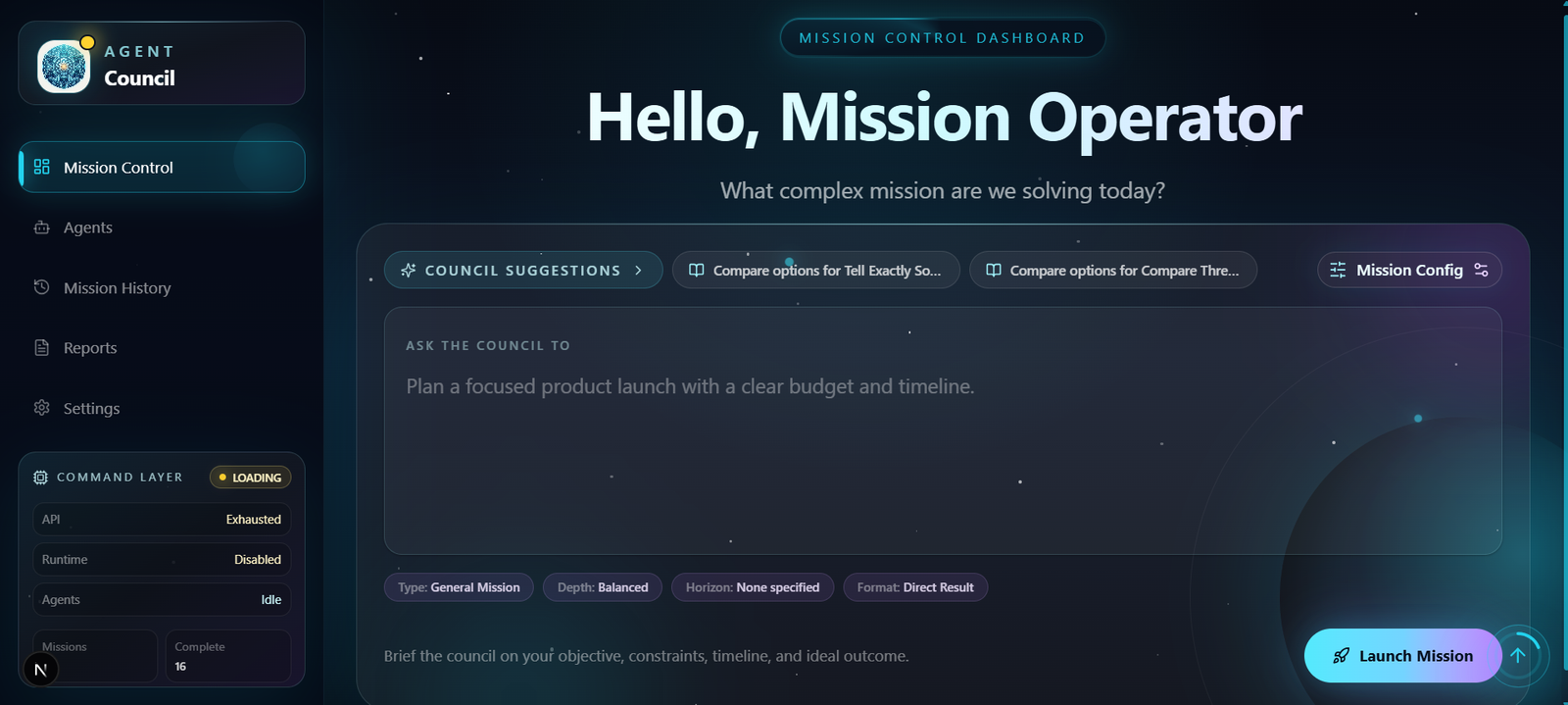
Brief the council, configure the mission, and launch a visible execution flow.
Meet the council
Nine specialists. One coordinated intelligence.
Each member brings a focused perspective to the mission, joining the council when their expertise can improve the final outcome.
Particle identity · 01
Planner
01 / 09 · orchestrator
Planner
“I turn broad missions into structured workstreams, dependencies and an execution path.”
Role confidence
94%
I focus on
Decomposition, sequencing and coordination.
I contribute: Mission Graphs, task dependencies and execution plans.. I do not: I organise the mission, but I do not replace specialist judgment.. Typical output: Mission Graph.
Typical output
Mission Graph
01 / 09 · orchestrator
Planner
“I turn broad missions into structured workstreams, dependencies and an execution path.”
Role confidence
94%
Portfolio demonstration value, not a live model probability.
- I focus on
- Decomposition, sequencing and coordination.
- I contribute
- Mission Graphs, task dependencies and execution plans.
I do not
I organise the mission, but I do not replace specialist judgment.
Typical output
Mission Graph
Project overview
A mission system that shows its reasoning path.
Rather than routing every request through one generic assistant, Agent Council classifies the mission, selects the smallest useful group of specialists, and coordinates their work through a Mission Graph when decomposition is useful.
Mission status
Classifier-led orchestration
The classifier first selects the smallest useful council. Planning, mediation, and synthesis join only when the mission calls for them.
Mission control
Live orchestration dashboard
Demonstration mission
Awaiting classification
Compare the strongest approaches for teaching Python to beginners.
Planner
offlineAwaiting classification
Research Agent
offlineAwaiting classification
Product Strategist
offlineAwaiting classification
Technical Architect
offlineAwaiting classification
Marketing Strategist
offlineAwaiting classification
Finance Agent
offlineAwaiting classification
Risk Critic
offlineAwaiting classification
Mediator
offlineAwaiting classification
Finalizer
offlineAwaiting classification
Classification locked
Research
Direct specialist path
Mission → classifier → selected route → validated report
Execution model
A replayable mission, not a black box.
The mission moves from a brief through planning and three parallel specialist workstreams, then merges into verification and a structured report.
01 / Intake
Mission brief
The operator defines the objective, constraints, and intended outcome.
02 / Configure
Mission configuration
Mission settings shape the council and the operating context.
03 / Classify
Mission classification
The engine selects the smallest useful execution path.
04 / Plan
Planning
The Planner maps dependencies into a visible Mission Graph.
05 / Execute
Parallel specialist execution
Specialists investigate their focused streams at the same time.
06 / Verify
Conflict detection
The council surfaces inconsistencies before they reach the report.
07 / Resolve
Mediation
Conflicting specialist outputs converge into a resolved decision.
08 / Synthesize
Final synthesis
The Finalizer turns validated work into a coherent answer.
09 / Deliver
Structured report
The result remains readable, replayable, and ready to act on.
Three focused specialist paths branch from Execute and converge into Verify before the mission is resolved and delivered.
Mission operating system
More than an answer.
A complete mission workspace.
Agent Council preserves every mission as a configurable, replayable and readable execution record—from the first brief to the final report.
Execution record
Mission replay
Replay mission events from intake through planning, specialist execution, conflict resolution and final synthesis.
Replay timeline
00:00 · Mission started
Mission Control · Brief accepted by Mission Control.
00:00Local continuity
Mission history
Revisit saved missions, inspect previous outcomes and continue working from earlier execution records.
Stored in this browser
Validated output
Generated reports
Turn validated agent work into a structured report containing decisions, risks, recommendations and next actions.
Before launch
Mission configuration
Shape the council before execution using mission type, depth, agents, timebox and operating preferences.
Appearance
Workspace personalization
Adapt the command centre through accent colours, interface preferences, animation controls and accessibility settings.
Command layer
Keyboard navigation
Move quickly between core workspace views using the application’s direct keyboard shortcuts.
Project showcase
Mission control stays legible from planning through final synthesis.
The interface brings mission configuration, workstreams, execution relationships, chapters, and reports into separate focused views rather than exposing raw internal payloads.
System architecture
One control surface, visible orchestration, local continuity.
The interface gathers a mission brief and configuration, while the Mission Control and Mission Engine classify the work, build or bypass a Mission Graph, coordinate the council, and pass structured results to presentation views. Local browser storage keeps saved settings, mission history, and replay events. Real execution calls a configured Qwen/DashScope-compatible API endpoint.
- This is a frontend-first hackathon implementation with no bundled backend or database.
- Mission history and replay data are stored locally in the browser.
- Qwen calls use the configured Qwen/DashScope-compatible endpoint.
- The development experience supports mock/demo behavior; real mission execution requires the operator's own API key.
Implementation toolkit
- Next.js
- React
- TypeScript
- Tailwind CSS
- Qwen/DashScope-compatible API
Project walkthrough
See the council in action.
This walkthrough introduces the mission-control experience and the way the project turns a brief into a visible multi-agent workflow.